Brainrot Brawl: 3D Arena Fighting Game
Browser Game3D arena fighting game with 11 meme fighters, special moves, Super attacks, Arcade ladder, and online rooms.

Brainrot Brawl Keyboard & Mouse Controls
More Free Games You'll Love

About Brainrot Brawl
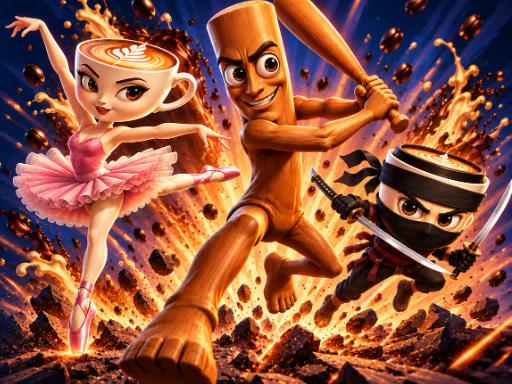
Brainrot Brawl brings internet meme characters into a structured 3D arena fighter built to run directly in modern desktop and mobile browsers. Rather than reducing combat to single-button chaos, the game pairs recognizable characters such as Tralalero Tralala, Tung Tung Tung Sahur, and Ballerina Cappuccina with traditional fighting game fundamentals including spacing, blocking, throws, and meter management.
Players can choose between three distinct ways to play depending on whether they want solo progression or head-to-head competition. Arcade mode sets up a multi-match ladder against escalating CPU rivals, Quick Match drops you straight into a single bout for practice or fast sessions, and online room creation generates a 4-letter room code so two friends on separate devices can duel without creating accounts.
Victory rewards coins that feed into a clear unlock loop across 11 playable fighters, alternate color palettes, and new stages. Daily missions and streak bonuses add short-term targets on top of Arcade clears, giving returning players steady incentives to experiment with unfamiliar fighters rather than sticking to a single matchup.
Mechanically, every character shares an intuitive input layout while bringing distinct normals, special attacks, and a screen-shaking Super finisher. Light attacks on J come out quickly to interrupt reckless approaches, Heavy strikes on K punish whiffs for higher damage, and Special moves on L expand range or close gaps.
Defensive options keep rounds from turning into pure mash-fests. Holding U raises a guard against standard strikes, while pressing J and K together performs a Throw that beats overly passive blocking. Knowing when to crouch with S or Down Arrow versus jumping with Space creates real risk-reward decisions on every exchange.
On JoyArc, Brainrot Brawl loads inside the responsive 16:9 browser player after you press Play, keeping the initial article and control reference fast to read before launching the 3D arena.
Brainrot Brawl Key Features & Highlights
Start with iconic internet characters like Tralalero Tralala, Tung Tung Tung Sahur, and Ballerina Cappuccina, then spend match coins to unlock the rest of the 11-character roster.
Climb the solo Arcade ladder, warm up in Quick Match against CPU opponents, or host an online room with a shareable 4-letter code for direct friend matches.
Combine Light (J), Heavy (K), Special (L), Block (U), Throw (J + K), and a Super attack (I) once your meter fills up.
Earn coins from matches, daily missions, and win streaks to unlock additional arenas and alternate character colors.
Play with crisp keyboard bindings on desktop or switch seamlessly to the built-in touch controls on phones and tablets.
How to Play Brainrot Brawl - Rules, Goals & Controls
- 1Click Play on JoyArc to launch Brainrot Brawl inside the 16:9 game frame, then pick Arcade, Quick Match, or Online Room from the main menu.
- 2Select one of the unlocked fighters and pick an available stage; if playing online, share the generated 4-letter room code with a friend.
- 3Move forward and backward using A/D or Left/Right Arrow keys to find your fighter's ideal striking distance.
- 4Open combinations with fast Light attacks (J), follow up with Heavy hits (K) or Specials (L), and press J + K together whenever a rival camps behind Block (U).
- 5Watch your Super meter build as you land and absorb hits; once full, press I within range to trigger your character's high-impact Super move.
- 6Collect match coins and complete daily missions after each bout to unlock all 11 fighters, extra color palettes, and stages.
Brainrot Brawl Pro Tips & High-Score Strategies
- Do not open every exchange with Heavy (K) or Special (L)—fast Light attacks (J) beat slower startups up close and confirm safely into bigger hits.
- Use Throw (J + K) whenever an opponent holds Block (U) after getting knocked down; mixing throws with low crouches forces defenders to guess.
- Save your Super meter (I) to punish predictable jump-ins or whiffed heavy attacks rather than throwing it blindly from full screen.
- Clear daily missions before grinding long Arcade ladders—mission coin bonuses dramatically speed up unlocking all 11 characters.
- Practice spacing in Quick Match first when learning a newly unlocked fighter so you know the exact reach of their L Special before taking them into an online room.
This guide describes the version hosted on JoyArc. Explore more Action games.