Kick the Zombie: Ragdoll Sandbox — Ragdoll Sandbox Online
Browser GameSlapstick Ragdoll Physics Sandbox. Drag, fling, boot, zap, freeze and cannon-launch a cartoon zombie across bouncy rooms.
Kick the Zombie: Ragdoll Sandbox Keyboard & Mouse Controls
More Free Games You'll Love

About Kick the Zombie: Ragdoll Sandbox
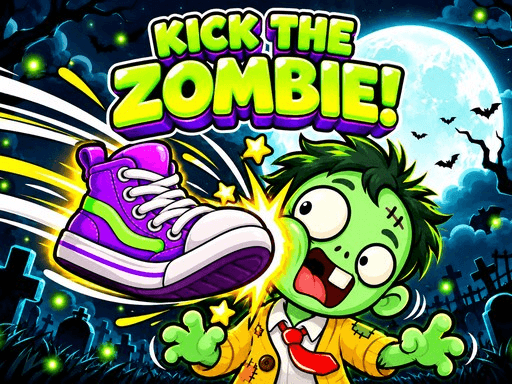
Kick the Zombie: Ragdoll Sandbox is pure slapstick stress relief built around a rubbery physics toybox. You meet Gus, a polite cartoon zombie hanging out in a moonlit graveyard, who happily bounces off rubbery headstones, walls, and ceilings whenever you grab him and send him flying—even when his head pops loose and hops right back onto his shoulders.
Instead of repetitive clicking with a single action, the toolbar hands you an escalating toy chest of silly contraptions. Boot Gus across the room with a giant sneaker, bonk him with a cartoon frying pan, shock him with a zapper, freeze him solid before shattering his momentum, tie helium balloons so he drifts upward, or load him straight into a pumpkin cannon.
Exploring matters too: tapping the room doors moves the sandbox into fresh interactive backdrops with different wall bounce layouts and props, keeping chain-reaction experiments varied. Best of all, there are no timers, fail conditions, or complicated keybindings—everything works smoothly through simple mouse or touchscreen drags and taps.
Because no keyboard is required at all, Kick the Zombie: Ragdoll Sandbox plays effortlessly on phones, tablets, Chromebooks, and desktops with zero downloads.
Part of the charm comes from layering gadgets on top of one another rather than clicking just one button repeatedly. Floating Gus near the ceiling with helium balloons before blasting him sideways, or freezing him mid-bounce so his stiffened body ricochets crisply between grave markers, turns each room into a playful physics comedy stage.
Because every bounce resets cleanly without punishing game-overs, energy bars, or paywalls, you can dip into Kick the Zombie for a quick two-minute laugh on a phone or Chromebook anytime.
Switching rooms via the clickable doors refreshes the geometry you play against, giving bouncy headstones, low ceilings, and open corners different rebound behaviors depending on where you toss Gus.
From giant sneakers and frying pans to helium balloons and pumpkin cannons, every gadget delivers immediate visual comedy without needing a single keyboard key.
Try mixing upward balloon lifts with sudden sideways kicks or freeze blocks to see how different surface angles across the graveyard rooms bounce Gus around.
Kick the Zombie: Ragdoll Sandbox Key Features & Highlights
Grab, drag, and fling Gus across bouncy graveyard walls with cartoonish joint physics.
Swap between giant sneaker kicks, frying pans, zappers, freeze rays, balloons, and pumpkin cannons.
Tap room doors to change arenas and test tools against different layouts.
Every grab, throw, and tool trigger works with one finger on mobile or a single mouse button.
No scores to lose or timers to stress over—open in your browser and experiment freely.
How to Play Kick the Zombie: Ragdoll Sandbox - Rules, Goals & Controls
- 1Click or touch and drag Gus anywhere in the room to pick him up and fling him against walls or tombstones.
- 2Tap any gadget icon along the toolbar to switch from bare-hand flinging to kicks, frying pans, freeze rays, zappers, balloons, or cannons.
- 3Click or tap near Gus while a tool is active to trigger its physics effect.
- 4Combine effects—such as tying balloons first or freezing him mid-air—for funnier chain reactions.
- 5Tap the room door whenever you want to swap into another graveyard scene.
Kick the Zombie: Ragdoll Sandbox Pro Tips & High-Score Strategies
- Tie balloons onto Gus first, wait until he floats near the ceiling, and then smack or zap him for long diagonal bounces.
- Try freezing Gus mid-flight and flinging the stiff ice block into bouncy headstones for crisp ricochets.
- Use short sharp flicks with the mouse or finger rather than slow drags to give throws maximum launch speed.
- Switch rooms via the door whenever you want fresh props and corner angles to bounce off.
- No keyboard is needed, making this ideal to play one-handed on a tablet, phone, or Chromebook trackpad.
- Aim throws toward angled tombstones or upper corners so Gus chains two or three rapid bounces before settling.
This guide describes the version hosted on JoyArc. Explore more Casual games.