SWAT OPS: Body Camera — Bodycam Game Online
JoyArc OriginalFirst-person 3D tactical bodycam corridor shooter. Sweep dark sectors with your weapon light, land precision headshots, and earn S-rank clears.


The game interface supports both English and Simplified Chinese with instant in-game switching. No installation required; best mission grades and clear times save in this browser.
Best mission grade, fastest full clear time, missions cleared, total headshots, mute state and language preference are saved locally in browser storage when available. There is no cloud save or online multiplayer.
SWAT OPS: Body Camera Keyboard & Mouse Controls
More Free Games You'll Love


About SWAT OPS: Body Camera
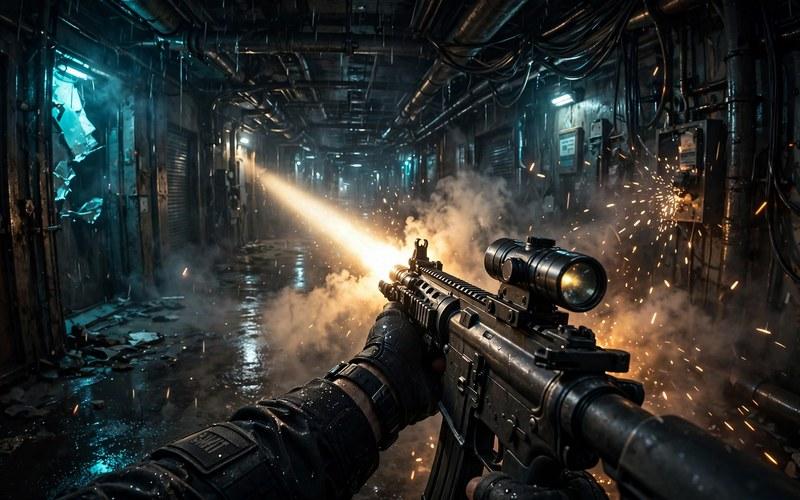
SWAT OPS: Body Camera is a first-person 3D tactical corridor and alley clearing shooter built for the browser. You step into the shoes of a point operator wearing a chest-mounted wide-angle camera, sweeping through three dimly lit security zones: Alley Breach, Cargo Yard and Penthouse Vault. Each sector challenges you to use crate cover, wall corners and weapon discipline to eliminate armed patrols before they catch you in an open lane.
The visual presentation leans directly into authentic body-worn camera telemetry. A wide ninety-two degree field of view captures tight alley corners and peripheral threats, while subtle breathing sway, footstep micro-roll and weapon recoil kick convey movement weight without disorienting the aim reticle. Around the frame, a live recording badge, mission stopwatch, threat counter, armor bar and magazine telemetry turn the viewport into an active tactical feed.
Lighting plays a central tactical role in every firefight. Your carbine carries a toggleable tactical spotlight that cuts sharp pools of light across damp brickwork, shipping crates and concrete pillars, while hostile operatives reveal their positions with glowing helmet visors and faint red laser cues. You can snap into aim-down-sights zoom to narrow the lens to sixty-six degrees for long-corridor headshots, or leave the light off momentarily when repositioning behind hard cover.
Combat rewards deliberate precision over blind spraying. Every hostile unit carries separate head and torso hitboxes: body hits deal standard rifle damage partially absorbed by tactical vests, whereas helmet visor hits deliver double critical damage and briefly stagger the target. Armed operatives actively patrol assigned lanes, raise alerts on line of sight and return fire with visible muzzle flashes and tracer streaks, so peeking around pillars and timing reloads behind cover are essential habits.
Between firefights, fallen enforcers and captains frequently drop bright tactical armor plates alongside sector ammo caches. Clearing all threats in a zone triggers an immediate resupply and grades your run from C up to S based on clear time against par, shot accuracy, headshot count and damage taken. Your highest mission grade, fastest full-operation clear time and career headshot total are recorded locally in browser storage so you can replay sectors to sharpen your route.
SWAT OPS: Body Camera Key Features & Highlights
A ninety-two degree wide-angle lens, subtle barrel vignette, scanline overlay, live recording clock and chest-mounted footstep sway give every breach a distinct tactical feed feel.
Advance from the rain-slicked Alley Breach through the crossfire lanes of Cargo Yard to the nine-guard Penthouse Vault, with increasing hostile armor and cover layouts.
Toggle your camera-mounted tactical spotlight to pierce dark corridors and snap into sixty-six degree aim-down-sights zoom for steady long-range precision shots.
Separate collider zones reward disciplined aim: helmet shots deal double damage and stagger threats, while chest armor absorbs part of standard torso hits.
Collect dropped armor plates and ammo crates mid-breach, then earn S, A, B or C evaluations scored by par time, accuracy, headshots and survivability.
Suppressed rifle cracks, metallic shell clinks, three-stage reload clicks, hit markers and dispatch radio chirps are synthesized live with an instant mute toggle.
How to Play SWAT OPS: Body Camera - Rules, Goals & Controls
- 1Press Deploy to enter Sector 01 (Alley Breach) and click the viewport on desktop to engage Pointer Lock mouse aiming, or drag the aim zone on touchscreens.
- 2Move along cover crates and concrete pillars using WASD or the left virtual thumbstick, holding Shift when you need to sprint across an exposed gap.
- 3Keep your weapon flashlight switched on with Q or F to illuminate dark brickwork and spot enemy visors and red laser beams before they acquire line of sight.
- 4Aim with the center holographic reticle, press Right Click or V to zoom in for long corridor angles, and fire controlled bursts with Left Click toward enemy helmets.
- 5Monitor your thirty-round magazine and hit R behind cover before pushing the next doorway; pick up glowing blue armor plates and yellow ammo packs as you advance.
- 6Eliminate every hostile listed on the top-left threat counter to unlock the sector debrief, inspect your S/A/B/C grade and breach the next zone.
SWAT OPS: Body Camera Pro Tips & High-Score Strategies
- Slice corners slowly instead of stepping straight into the middle of an alley; exposing only one pillar edge at a time keeps multiple guards from firing simultaneously.
- Prioritize the glowing helmet visor over center mass whenever a target stands still—two clean headshots neutralize armored enforcers far faster than emptying half a magazine into vests.
- Toggle aim-down-sights zoom for deep hallway duels, then switch back to wide ninety-two degree hip view when moving around tight crate stacks so flanking threats stay visible.
- Listen for the synthesized shell clinks and watch your magazine readout after every skirmish; reloading at six or eight remaining rounds prevents getting caught dry mid-peek.
- Aiming for an S grade requires balancing speed against accuracy: missed panic shots hurt your hit percentage just as much as lingering too long past the sector par time.
This guide describes the version hosted on JoyArc. Explore more Action games.